
Export CSV from Nordnet
Last updated: Jan 20, 2026
Beta Status
The Nordnet CSV parser is currently in Beta. Please report any issues you encounter to us.
This guide will help you export your transaction data from Nordnet in CSV format, for use in Skatteguru.
While Nordnet does provide tax reporting services, there are some reasons why you might want to use Skatteguru instead:
- Multiple brokers: If you've traded the same security across different brokers (not just Nordnet), your average cost basis needs to be calculated with all transactions combined. Nordnet only knows about transactions within their platform.
- Verification: You are personally liable for the accuracy of your K4 form. Skatteguru gives you the tools to verify and understand your tax situation.
- Riksbanken rates: For foreign currency transactions, Skatteguru uses Sveriges Riksbank's official exchange rates, which Skatteverket recommends.
Steps to export CSV from Nordnet
1
Log in to Nordnet
Go to nordnet.se and log in to your account
2
Select your AF account (brokerage/dep\u00e5 account)
Important: Select the correct account type
Do not export transactions from these account types:
- ISK (Investeringssparkonto - Investment Savings Account)
- KF (Kapitalförsäkring - Capital Insurance)
- TJP (Tjänstepension - Pension)
These account types are tax-deferred or tax-exempt and not relevant for capital gains tax calculations (K4 form).
3
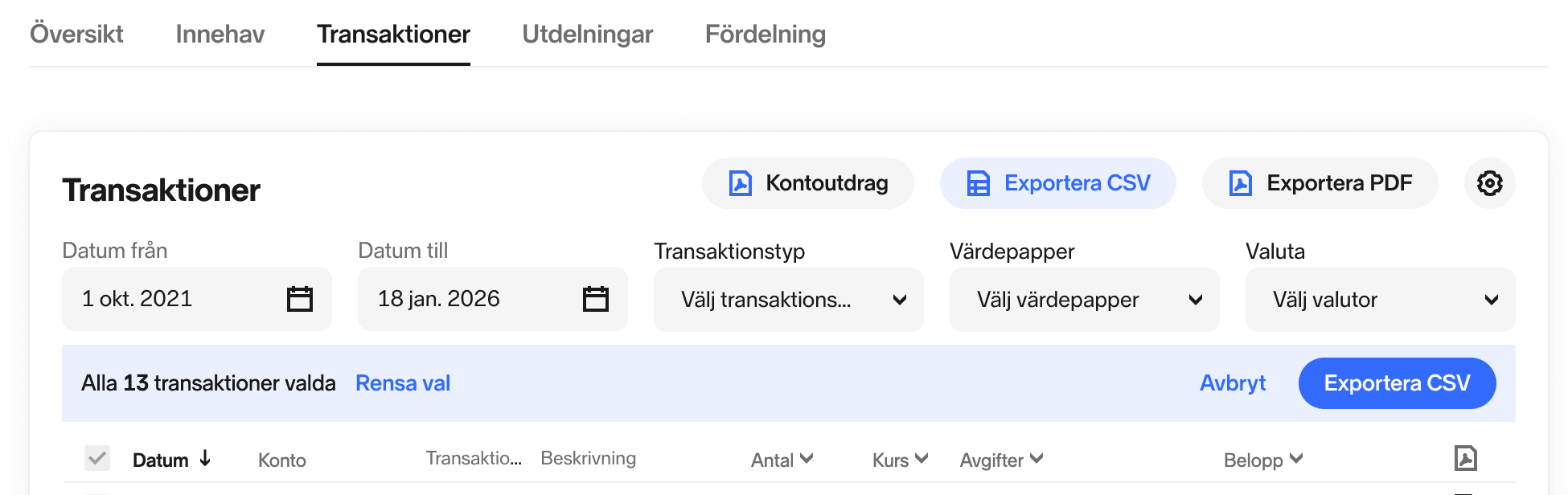
Go to Transaktioner (Transactions) tab
Navigate to the transactions view to see your trading history
4
Select the date range
- Date from: The earliest date you had any trade
- Date to: Today's date
Select your entire trading history
This ensures accurate calculation of your average acquisition value. Missing historical transactions can lead to incorrect tax calculations.
5
Optionally filter transactions
You can filter by transaction types or specific securities if needed
6
Export and download
Click the Exportera (Export) button and choose CSV format.
7
Upload to Skatteguru
Download the file and upload it to Skatteguru

We're Here to Help
Have questions or feedback? We'd love to hear from you. Get in touch.