Upload Documents
Last updated: Jan 14, 2025
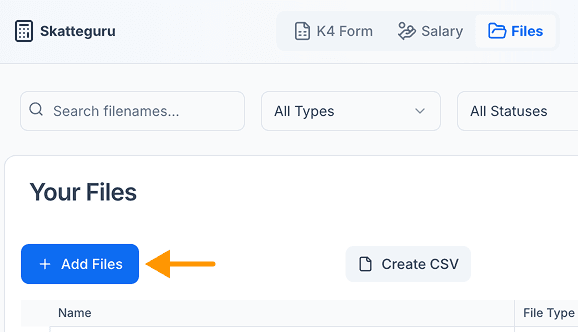
After gathering all your documents in one folder, navigate to your Files.
- Click on the "Add Files" button and follow the instructions.
- Try the "E-Trade Wizard" if you have documents from E-Trade.
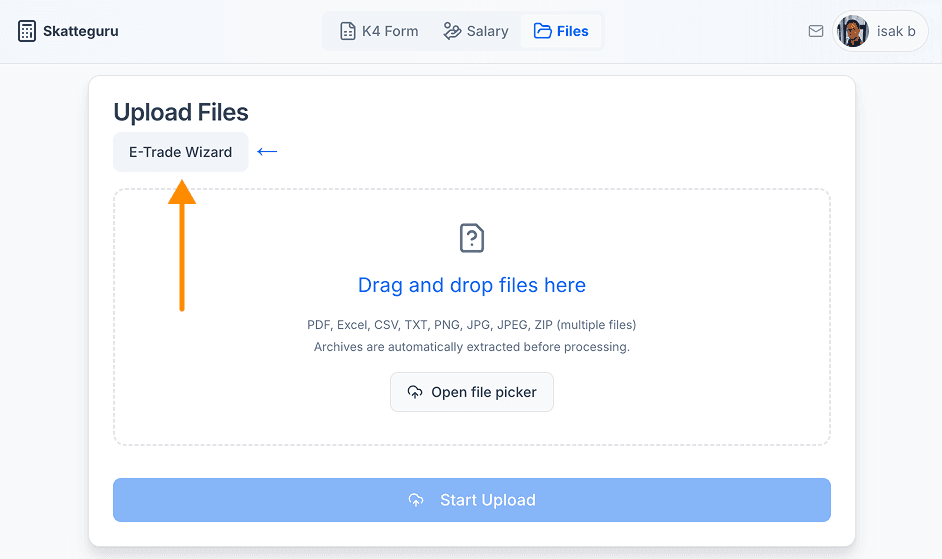
- After clicking the "Start Upload" button, you will see a progress indicator showing the upload progress for each file.
- When all files have been uploaded, they will be shown in the "Files" section below the Upload Files box.
- You can see the status of each file in the table.
- Once you see that all your files have the status "Done", you can proceed with the analysis.
Upload Process
Wait until all documents have been uploaded. Verify that the number of successfully uploaded documents matches the number you originally uploaded.
Note
If you have any issues with the upload, please try to upload the documents again. Identical documents are automatically ignored as duplicates and will not be uploaded again.
Queued Document Issues?
If only some or none of your documents are done processing after waiting 10 minutes, and if you are unable to upload these documents again, please try to delete all your files from Skatteguru by pressing the "Delete All Files" button. Then upload all your files again in smaller batches (around 50 files at a time). This is a workaround for a known issue affecting some users with hundreds of files. Contact us for assistance if you are still having issues after this.

We're Here to Help
Have questions or feedback? We'd love to hear from you. Get in touch.