SkatteguruSkatteguru2.6 Beta
How It WorksPricingFAQHelpNews
Start For Free

Product

  • Pricing
  • News
  • Reviews

Contact

  • Help Center
  • Contact Us
  • Report an Issue
  • Follow on X

Legal

  • Terms of Service
  • Privacy Policy
  • Cookie Policy
  • Cookie Settings
© 2026 Skatteguru
    1. Home
    2. Help Center
    3. Filing
    4. Exporting Files

    Exporting Your Files

    Last updated: November 6, 2025

    Easily download and export all your uploaded files with our convenient one-click download feature. Whether you need to create backups, transfer files to other services, or keep local copies, this feature makes file management simple and secure.

    1

    Navigate to your Files dashboard

    Files dashboard
    2

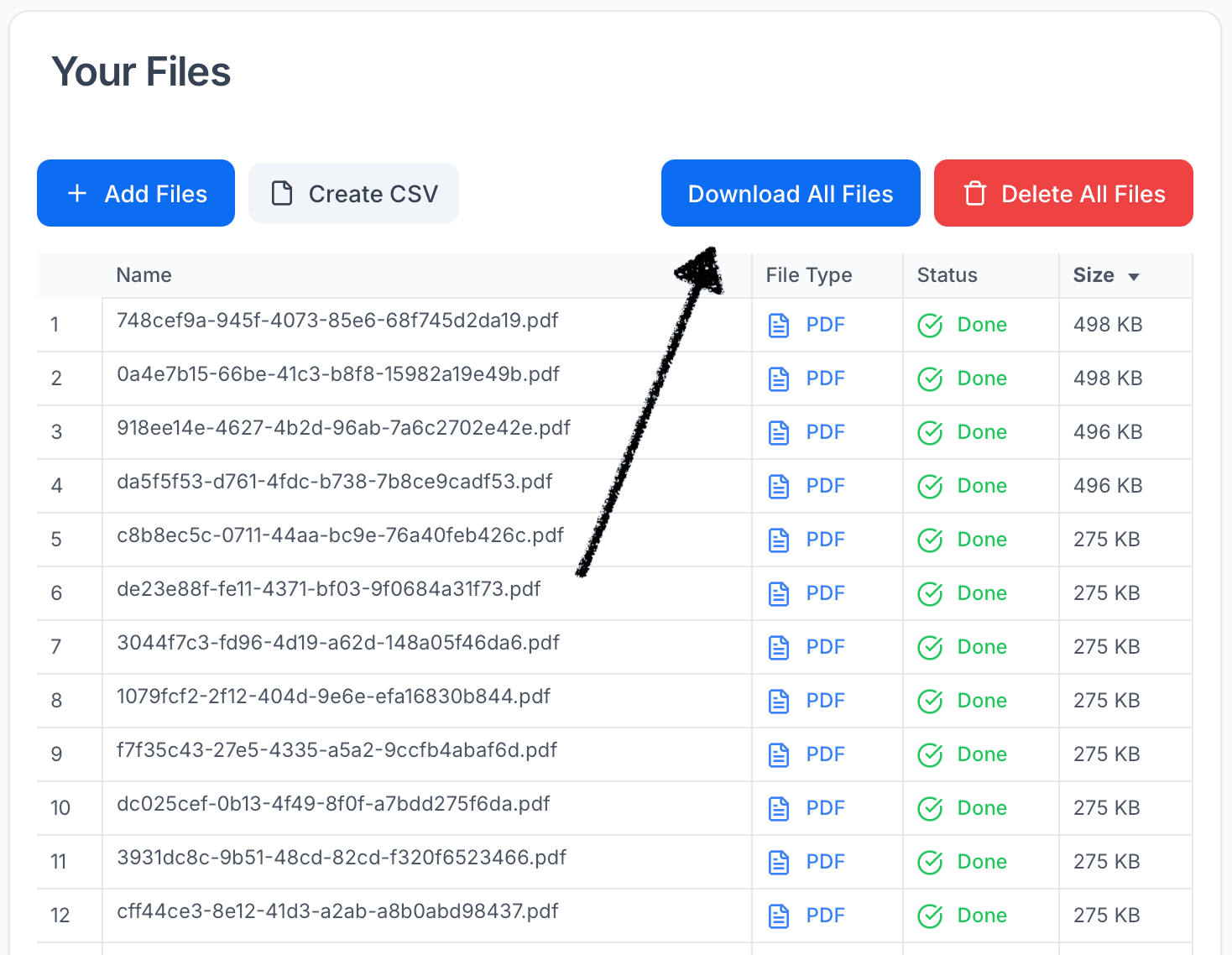
    Click the "Download All Files" button

    Generate a ZIP archive.
    Download all files button
    3

    Wait for the system to prepare your download package

    The system will collect and package all your files.
    4

    Click the download link when it appears

    It will be valid for 1 hour.
    5

    Save the ZIP file to your computer

    Extract the contents to access your files.

    How the Download Process Works

    When you click "Download All Files", our system automatically collects all your uploaded files, packages them into a single ZIP archive with organized filenames, and generates a secure, time-limited download URL.

    Smart File Handling

    Our system automatically handles duplicate filenames by adding sequential numbers, ensuring that every file in your archive has a unique name. This prevents conflicts and makes it easy to identify all your documents.

    Secure and Convenient

    Time-Limited Access

    Your download link is protected with secure, signed URLs that automatically expire after one hour. This ensures your files remain private and accessible only to you during the download window.

    Original File Preservation

    The ZIP archive includes all your original files with their original names and formats, making it easy to organize and manage your documents locally.

    Perfect For

    Backup Creation

    Create regular backups of your tax documents to ensure you always have access to your important financial records.

    File Transfers

    Transfer files to accounting software, other tax services, or share documents with your accountant after downloading.

    Local Storage

    Keep local copies for your personal records, ensuring you have offline access to all your tax documents.

    Document Organization

    Organize your files locally with the original names and structure preserved in the download package.

    Troubleshooting

    Download Link Expired?

    If your download link expires before you can download the files, simply click the "Download All Files" button again to generate a new link. The link is valid for 1 hour to ensure security.

    Large File Collections

    If you have a very large number of files, the download preparation may take a few moments. Please be patient while the system collects and packages all your files.

    Ready to Export Your Files?

    Access your files dashboard to download all your files with a single click. Your download will include all uploaded documents in their original format, organized in a convenient ZIP archive.

    Go to Files Dashboard

    Skatteguru mascot

    We're Here to Help

    Have questions or feedback? We'd love to hear from you. Get in touch.